What Is Intelligent Document Processing (IDP) and How Does It Work?
Intelligent Document Processing (IDP) combines AI, OCR, machine learning, NLP, and workflow automation to extract, understand, validate, and process information from documents and emails. Learn how IDP works, its benefits, key technologies, real-world use cases, and how businesses can automate document-heavy workflows while improving efficiency, ac
Businesses generate and receive enormous amounts of information every day.
Invoices, purchase orders, quotations, application forms, contracts, receipts, claims documents, shipping records, reports, identity documents, emails, and other business records all contain valuable information.
But having the information is only the first step.
Businesses also need to extract the right data, understand it, validate it, structure it, and move it into the systems where it can be used.
For many organizations, that process still involves significant manual work.
Employees may have to open documents individually, read the information, identify important fields, copy data into spreadsheets or business applications, verify the information, and move it to the next stage of the workflow.
When hundreds or thousands of documents are processed every day, this becomes slow, repetitive, expensive, and difficult to scale.
This is where Intelligent Document Processing (IDP) comes in.
Intelligent Document Processing combines technologies such as artificial intelligence, machine learning, Optical Character Recognition (OCR), Natural Language Processing (NLP), computer vision, document intelligence, validation, and workflow automation to extract and understand information from documents.
Unlike basic document processing, IDP goes beyond simply reading characters. It attempts to understand the content, identify relevant information, interpret relationships between fields, validate extracted data, and convert unstructured or semi-structured information into structured business data.
In simple terms:
Intelligent Document Processing turns information trapped inside documents and emails into usable business data with less manual effort.
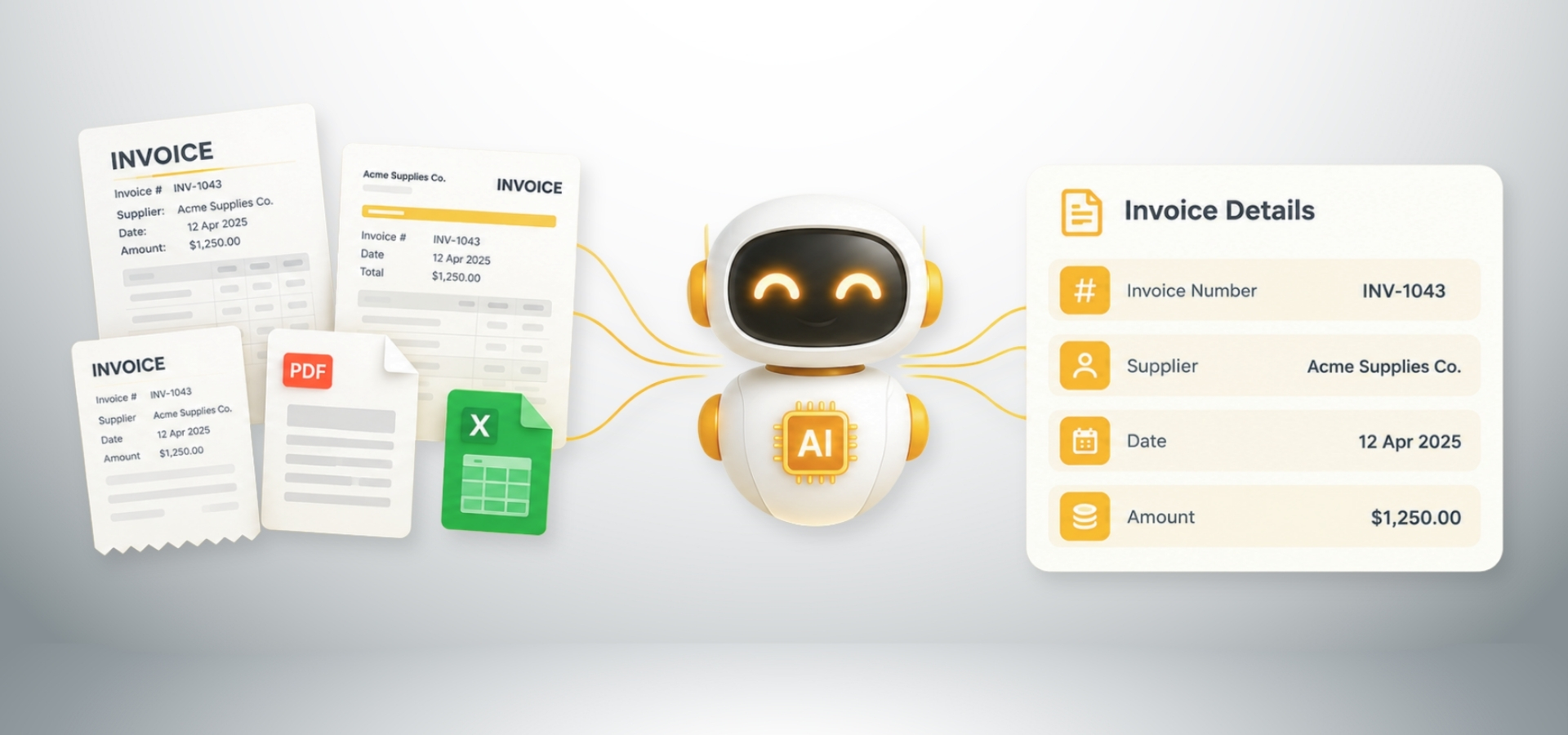
What Is Intelligent Document Processing?
Intelligent Document Processing (IDP) is a technology-driven approach to automatically capturing, reading, extracting, understanding, validating, and processing information contained in digital and physical documents.
The purpose is to reduce the manual work involved in handling documents and converting their contents into structured, actionable information.
Traditional document processing often depends heavily on people.
An employee reads a document, identifies the required information, enters the data into another system, and checks whether it is correct.
IDP can automate many of these activities.
The important word is "intelligent."
Traditional automation often relies on predefined rules or fixed templates.
For example:
"Capture the value located in this specific area of the document."
That approach can work when documents consistently follow the same format.
But real-world business documents rarely do.
Two suppliers may send invoices containing the same information in completely different layouts. One may use "Total Amount," another "Amount Due," while another may use "Grand Total."
An intelligent document processing system needs to understand that these different expressions can represent the same business concept depending on the context.
This is where AI, machine learning, NLP, computer vision, and document intelligence become important.
A simple definition of IDP
Intelligent Document Processing is the use of AI, OCR, machine learning, NLP, computer vision, validation, and automation technologies to extract, understand, validate, and process information from documents.
IDP can be applied to many types of information, including:
Purchase orders
Quotations
Receipts
Application forms
Insurance claims
KYC documents
Contracts
Shipping documents
Bills of Lading
Airway Bills
Reports
Customer forms
Tax documents
Statements
Emails and attachments
Identification documents
The exact documents and workflows supported depend on the IDP platform and the organization's requirements.

Why Is Intelligent Document Processing Important?
Businesses have been digitizing information for years.
But digitization does not automatically mean automation.
A company may receive a PDF invoice instead of a paper invoice. The document is now digital, but if an employee still must open the PDF, read it, copy the information, and enter it into the accounting system, the process remains largely manual.
This is one of the problems IDP is designed to address.
The problem with manual document processing
1. It takes time
Employees can spend hours reading documents and entering information.
As document volumes increase, the time required to process them also increases.
2. It can lead to data-entry errors
People can accidentally enter incorrect:
Numbers
Dates
Names
Quantities
Amounts
Reference numbers
Even a small error can create problems in downstream processes.
3. It is difficult to scale
A process that works when a company receives 100 documents per week may become difficult to manage when it receives 10,000.
Adding more employees can increase processing capacity, but it also increases operational costs.
4. Employees spend time on repetitive work
Reading documents, copying information, checking fields, and entering data are often repetitive activities.
Employees could instead spend that time on analysis, customer service, supplier management, decision-making, and exception handling.
5. Processing can become inconsistent
Different employees may interpret or enter information differently.
Automated workflows can apply consistent extraction and validation of rules across documents.
How Does Intelligent Document Processing Work?
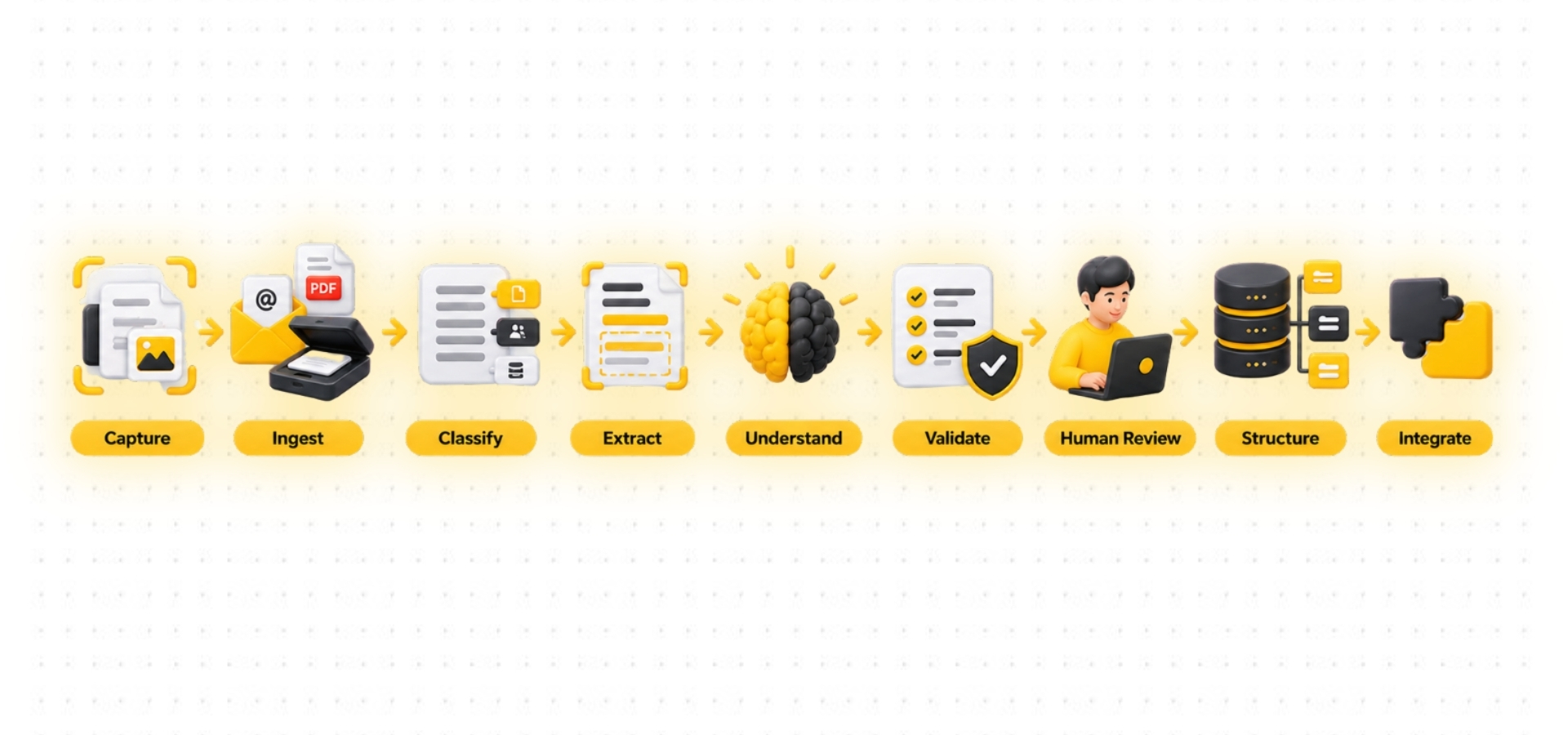
The exact architecture varies between IDP platforms, but a typical intelligent document processing workflow includes:
Capture → Ingest → Classify → Read → Extract → Understand → Validate → Review Exceptions → Structure → Integrate → Automate
Let's look at each stage.
1. Document Capture
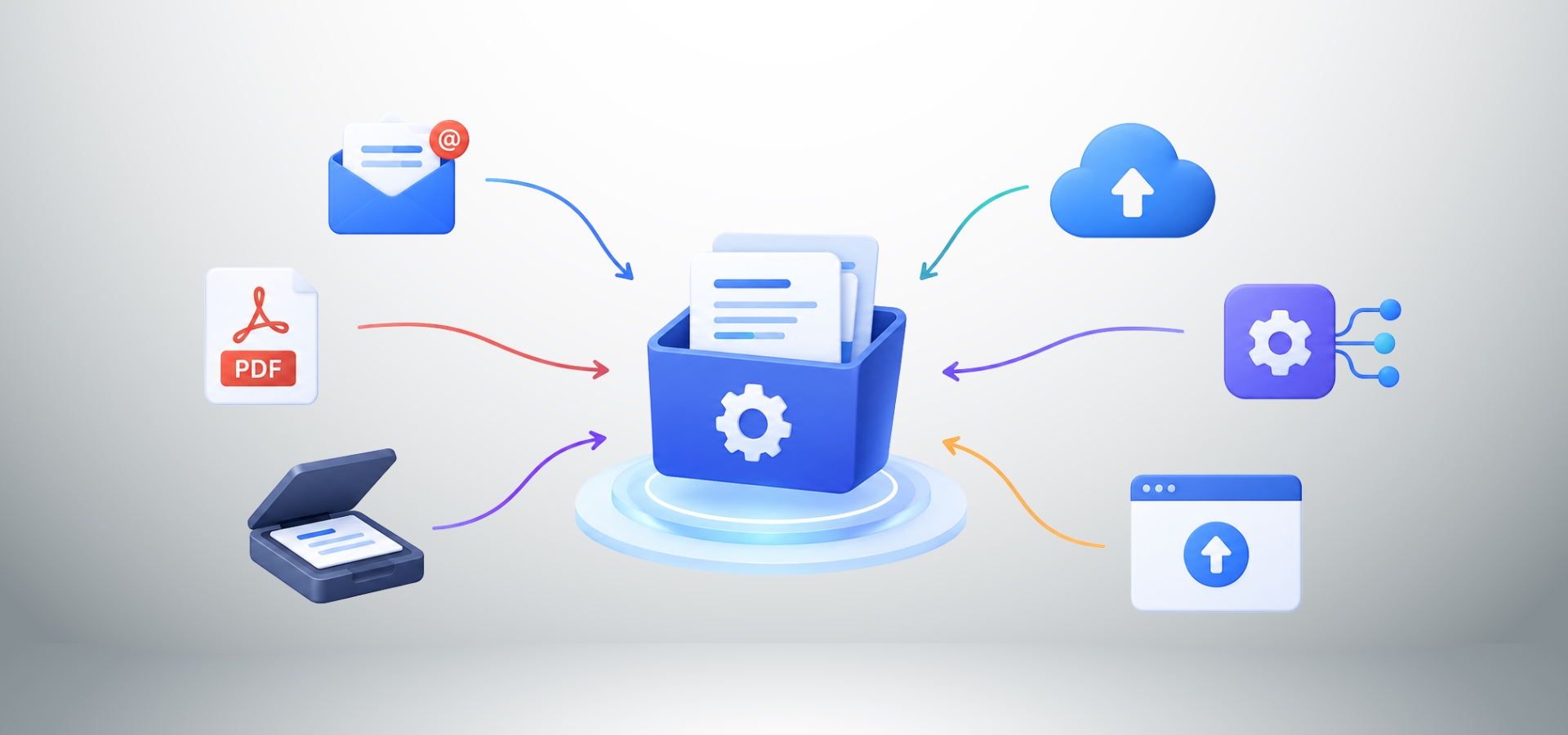
The first step is to get information into the processing system.
Documents can arrive through:
Email attachments
Document management systems
Cloud storage
Business applications
Scanners
Upload portals
APIs
Shared folders
Enterprise systems
For example, a supplier may send an invoice through email, while another business may receive a scanned application through an upload portal.
The IDP workflow needs to capture these inputs before processing them.
Once a document enters the system, it needs to be prepared for analysis.
Documents can come in different formats, including:
PDF
JPEG
PNG
Scanned documents
Word documents
Excel files
Emails
Email attachments
Some documents contain machine-readable text, while others are scanning images where the information is visible to a person but not directly readable by software.
An IDP workflow needs to handle these different formats
3. Document Classification
Before extracting information, the system may need to determine what type of document it has received.
For example:
Receipt
Claim Form
Bank Statement
Shipping Document
Customer Application
Classification helps determine which information needs to be extracted and which workflow should be applied.
For example, an invoice workflow may require:
Invoice number
Supplier name
Invoice date
PO number
Tax
Subtotal
Total amount
A shipping document would require a completely different set of information.
Some documents are difficult to read because they contain:
Low-resolution scans
Rotated pages
Background noise
Shadows
Stamps
Handwritten information
Skewed text
Poor contrast
Image preprocessing can improve the document before extraction.
Techniques may include:
Rotation correction
Noise removal
Image enhancement
Cropping
DE skewing
Contrast adjustment
This can improve the ability of OCR and other document-processing technologies to recognize information.
5. Optical Character Recognition (OCR)
OCR stands for Optical Character Recognition.
OCR converts text contained in an image or scanned document into machine-readable text.
For example, a scanned invoice may contain:
Invoice Number: INV-10482
OCR can recognize the characters and convert them into digital text.
But OCR alone does not necessarily understand what those characters mean.
OCR may recognize:
INV-10482
IDP can determine:
INV-10482 = Invoice Number
That distinction is important; OCR reads and IDP understands and processes.
OCR is therefore an important component of many IDP systems, but OCR alone is not the same as Intelligent Document Processing.
6. Data Extraction
Once the document can be read, the system identifies the information required by the business process.
For an invoice, this could include:
Supplier name
Invoice date
Due date
Purchase order number
Product descriptions
Quantities
Unit prices
Tax
Discounts
Total amount
For a customer application, it could include:
Name
Address
Contact information
Application number
Account information
The fields depend on the document and the business workflow.
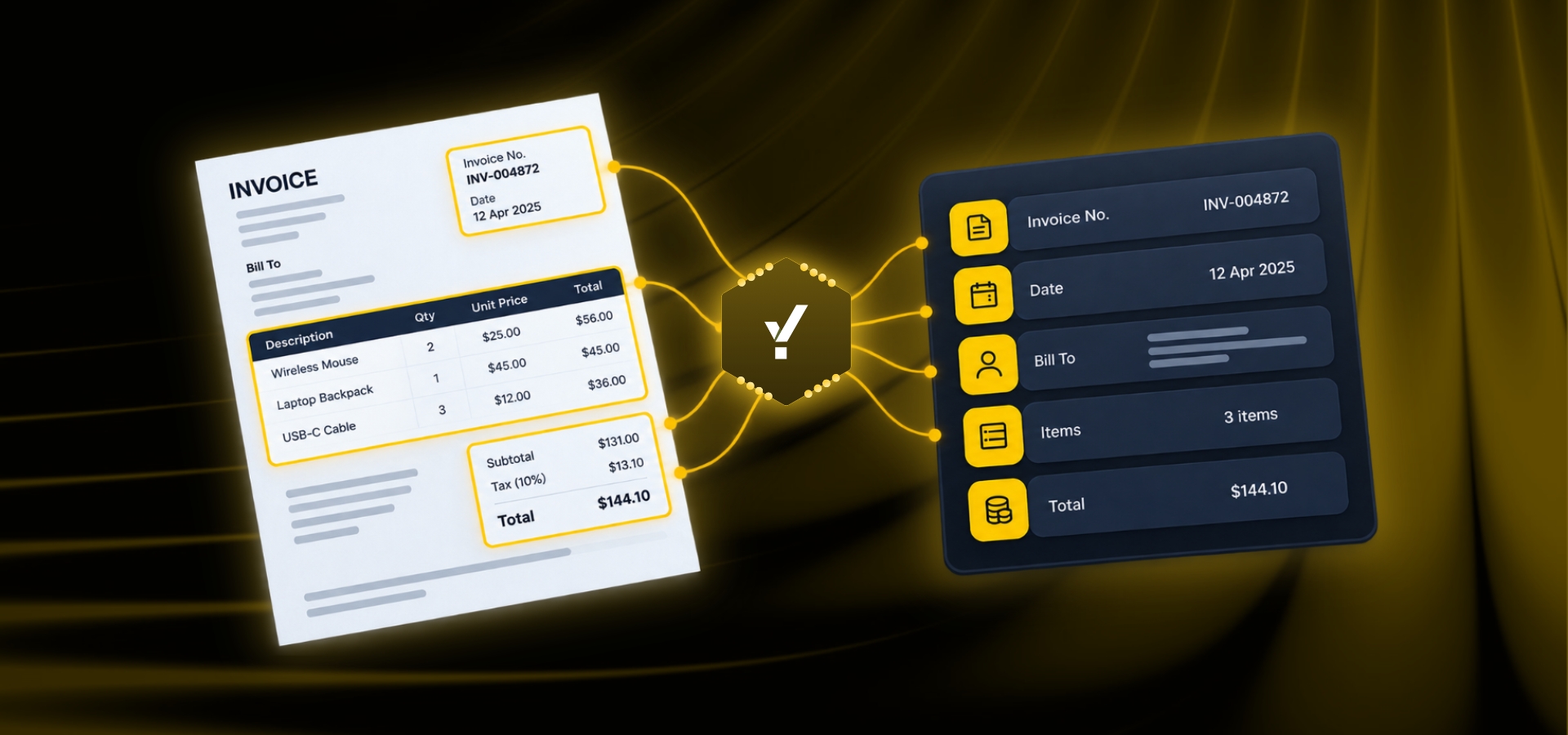
7. Document Understanding and Context
Extracting individual words is not enough.
An intelligent document processing system also needs to understand the relationship between pieces of information.
Consider:
Quantity: 10
Unit Price: ₹500
Total: ₹5,000
A person understands that these values are related.
Document intelligence can use AI, machine learning, NLP, and computer vision to understand these relationships and the context in which information appears.
This becomes particularly important when documents have different layouts, terminology, or structures.
Extracted information should not automatically be treated correctly.
Validation can check whether:
Required fields are present
Dates have valid formats
Amounts are valid
Purchase order numbers exist
Supplier information matches existing records
Quantities are consistent
Calculations are correct
Business rules are satisfied
For example:
Quantity × Unit Price = Line Total
or:
Subtotal + Tax − Discount = Total
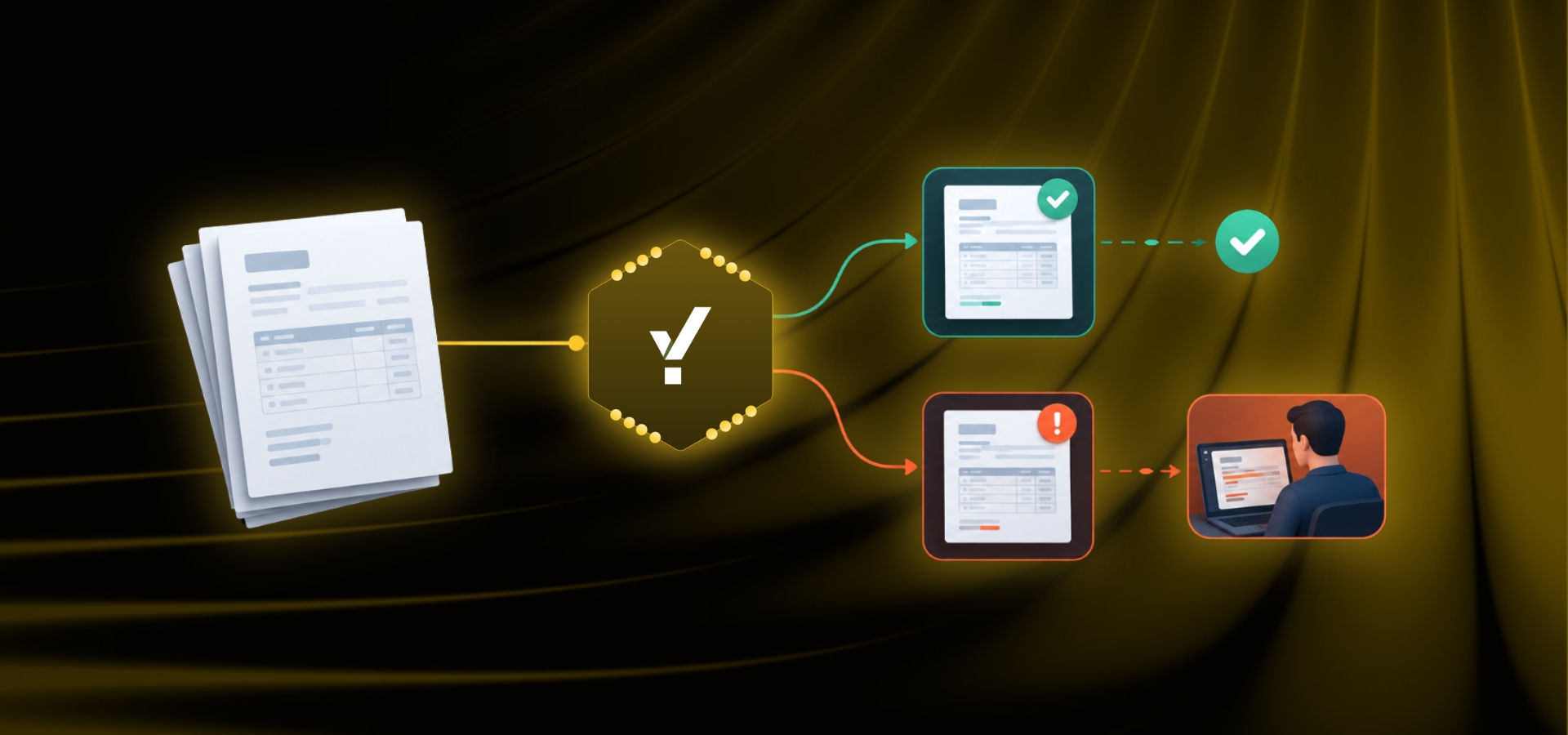
If a validation rule fails, the document can be flagged for review.
This is where IDP becomes more than data extraction and starts becoming part of a broader business process.
9. Confidence Scoring
IDP systems may assign confidence levels to extract information.
For example:
Invoice number → High confidence
Supplier name → High confidence
Total amount → High confidence
Poorly scanned handwritten field → Low confidence
Confidence levels can help determine whether information can continue automatically or should be reviewed by a person.
10. Human-in-the-Loop Review
Automation does not necessarily mean removing people from the process.
Some documents will always require additional attention.
A document may contain:
Poor-quality scans
Missing information
Unusual formats
Handwritten fields
Conflicting information
Instead of sending every document to an employee, an IDP system can process high-confidence information automatically and route exceptions to a human reviewer.
The objective is not necessarily:
Automate everything.
The objective is:
Automate routine processing and direct human attention toward exceptions and decisions.
11. Data Structuring
Business documents often contain unstructured or semi-structured information.
Business systems generally need structured data.
For example:
Document
ABC Supplies
Invoice INV-10482
10 September 2026
Total ₹85,400
Structured data
Supplier: ABC Supplies
Invoice Number: INV-10482
Invoice Date: 10 September 2026
Total: ₹85,400
This transformation is one of the core purposes of intelligent document processing.
12. Integration With Business Systems
The final objective is often to move structured information into the system where it is needed.
These may include:
ERP systems
CRM platforms
Accounting systems
Procurement platforms
Warehouse systems
Banking applications
Insurance systems
Logistics platforms
Databases
Custom business applications
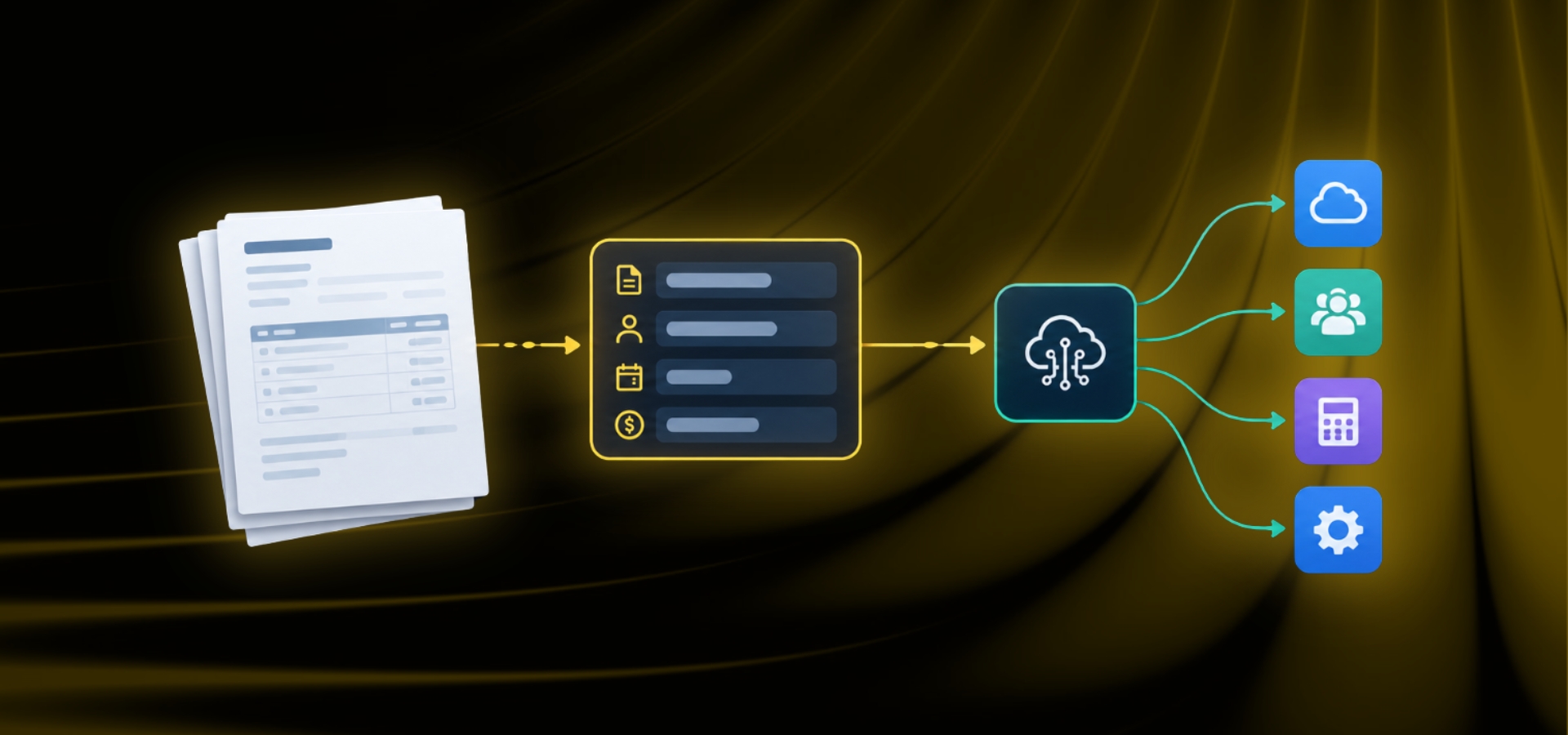
A typical workflow could be:
Invoice Received → IDP → Extraction → Validation → Structured Data → ERP
This allows IDP to become part of an end-to-end business workflow rather than simply functioning as a document reader.
What Technologies Power Intelligent Document Processing?
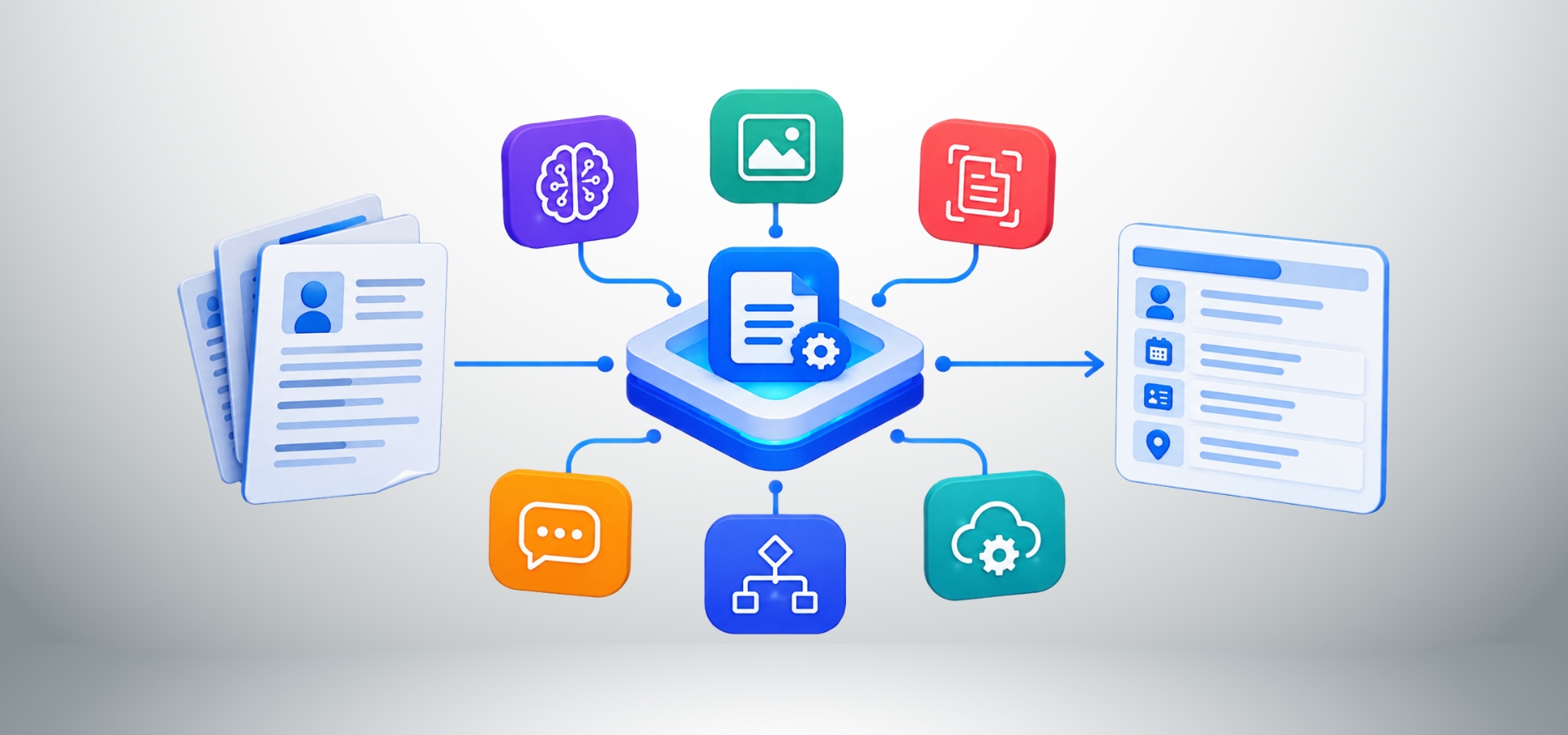
IDP is not based on a single technology.
It can combine:
Artificial Intelligence
Machine Learning
Natural Language Processing
Computer Vision
Document Intelligence
Business Rules
Workflow Automation
APIs and Integrations
AI can help systems recognize patterns, classify documents, identify information, understand context, and support processing decisions.
For example, terms such as:
Total
Total Due
Amount Due
Grand Total
Net Payable
may represent similar concepts depending on the document.
Machine learning can help systems identify patterns across documents.
For example, models can be used to classify invoices, recognize document characteristics, and support information extraction.
NLP helps systems understand information expressed through language.
This is particularly useful for:
Emails
Contracts
Reports
Applications
Other text-heavy documents
For example:
"Payment is due within 30 days from the invoice date."
A document intelligence system can identify concepts related to payment terms and due dates.
Computer Vision
Documents contain more than text.
They may include:
Tables
Logos
Signatures
Stamps
Columns
Headers
Footers
Images
Layout structures
Computer vision can help systems understand these visual elements and their relationships.
Business Rules
AI can be combined with explicit business rules.
For example:
If the invoice amount exceeds a defined threshold, route it for approval.
Or:
If a required field is missing, send the document for human review.
This combination of AI, validation, and business logic makes the workflow more controlled.
IDP vs Traditional Document Processing
Traditional document processing may look like:
Document → Employee reads → Employee extracts → Employee enters → Employee checks → System updated
An intelligent workflow can look like:
Document → Classification → AI extraction → Validation → Exception handling → Structured data → System update
The difference is not simply speed.
It is the shift from a heavily manual process toward an intelligent and automated workflow.
What Is the Difference Between OCR and IDP?
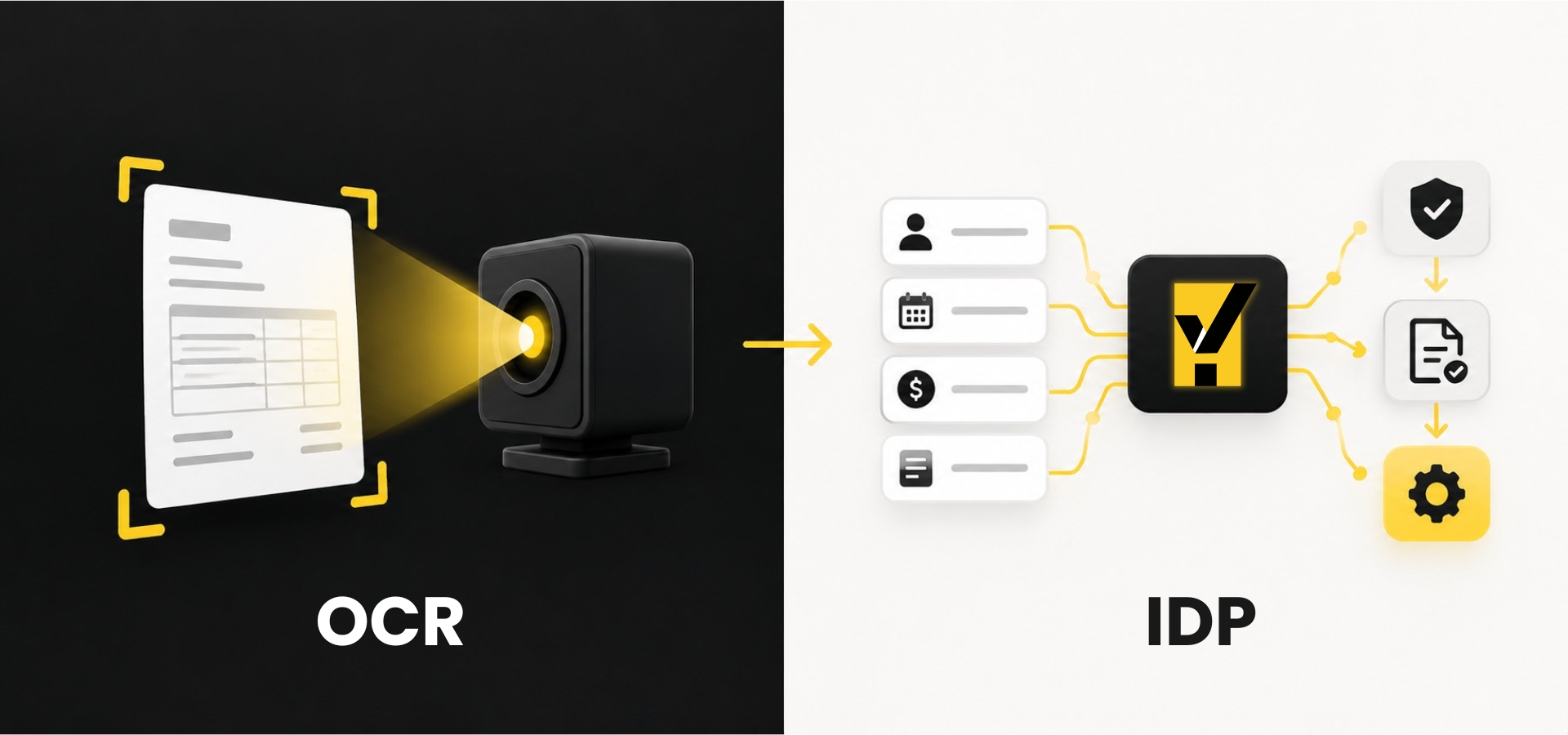
This is one of the most common questions around document automation.
OCR primarily focuses on recognizing characters and converting them into machine-readable text.
IDP
IDP combines OCR with additional capabilities such as:
Document classification
Context understanding
Data extraction
Validation
Business rules
Exception handling
Workflow automation
System integration
For example, a document may contain:
Invoice No: A-10982
Total Amount: ₹48,750
Due Date: 20 October 2026
OCR can recognize the text.
IDP can identify:
A-10982 → Invoice Number
₹48,750 → Total Amount
20 October 2026 → Due Date
It can then validate the information and make it available to the relevant business workflow.
So:
OCR is a technology used to read text. IDP is a broader approach to understanding, validating, and processing document information.
Benefits of Intelligent Document Processing
1. Reduced Manual Data Entry
IDP can reduce the need for employees to manually copy information from documents into business systems.
Automated workflows can process large document volumes faster than fully manual workflows.
3. Improved Data Quality
Automated extraction combined with validation can reduce certain types of manual data-entry errors.
4. Greater Operational Efficiency
Employees can spend less time on repetitive document handling and more time on analysis, decision-making, customer service, and exception management.
5. Scalability
Businesses can handle growing document volumes without increasing manual effort at the same rate.
6. Better Employee Productivity
Employees can focus on activities that require judgment and expertise rather than repetitive data entry.
7. Faster Access to Information
Once document information is converted into structured data, it can be searched, analyzed, compared, and passed to other systems.
8. Standardized Processing
Automated workflows can apply consistent extraction and validation rules.
9. Better Customer Experience
Faster internal document processing can contribute to quicker application, claims, order, onboarding, and other customer-facing processes.
10. Potential Cost Reduction
Reducing repetitive manual work can help organizations control operational processing costs.
The actual business value depends on document volume, workflow complexity, processing time, implementation cost, and the amount of manual effort reduced.
What Types of Documents Can IDP Process?
IDP can be applied to a wide range of business documents.
Financial Documents
Invoices
Receipts
Statements
Credit notes
Debit notes
Tax documents
Procurement Documents
Purchase orders
Supplier quotations
Supplier forms
Delivery documents
Contracts
Logistics Documents
Bills of Lading
Airway Bills
Delivery Orders
Packing Lists
Commercial Invoices
Customs documents
Proofs of Delivery
Customer and Operational Documents
Application forms
Customer forms
Claims
Reports
Identity documents
Emails and attachments
The appropriate use case depends on the organization's workflow, document volume, and business requirements.
Intelligent Document Processing Use Cases
A typical workflow can be:
Invoice Received → Classification → Extraction → Validation → Approval → ERP
The system can extract supplier information, invoice details, amounts, tax information, and references before passing the information to the next stage.
Accounts Payable Automation
Accounts payable teams can use IDP to capture invoice information, validate it, identify exceptions, and route invoices for approval.
Instead of reviewing every invoice manually, employees can focus on documents that actually require attention.
Procurement teams work with:
RFQs
Supplier quotations
Purchase orders
Supplier forms
Contracts
Invoices
Delivery documents
IDP can help extract and connect information across these documents.
For example:
Supplier Quotation → Extract → Structure → Compare → Procurement Decision
Purchase Order and Delivery Document Validation
A company may already have a purchase order in its ERP.
The supplier then sends a Delivery Order through email, PDF, or Excel.
The procurement or warehouse team may need to:
Identify the relevant PO
Check supplier details
Compare items
Compare quantities
Identify discrepancies
Update the business system
An intelligent workflow can support:
PO in ERP → Supplier DO → Extract → Match → Validate → Exception Handling → ERP
This is a practical example of using IDP as an intelligence layer around an existing enterprise system.
Logistics Document Processing
Logistics operations can involve many documents moving between suppliers, freight forwarders, warehouses, customs authorities, and customers.
These may include:
Bills of Lading
Airway Bills
Commercial Invoices
Packing Lists
Delivery Orders
Customs documents
Proofs of Delivery
IDP can extract information such as:
Shipment number
Shipper
Consignee
Quantity
Weight
Destination
Reference number
The structured information can then be used within logistics workflows.
Proof of Delivery Verification
High-volume logistics operations may need to verify whether a Proof of Delivery:
Belongs to the correct shipment
Belongs to the correct customer or recipient
Contains required information
Contains the required signature
Matches expected quantities
Is complete
An intelligent document workflow can compare POD information against shipment or order data and route discrepancies for review.
This can help reduce manual verification effort.
IDP in Finance and Banking
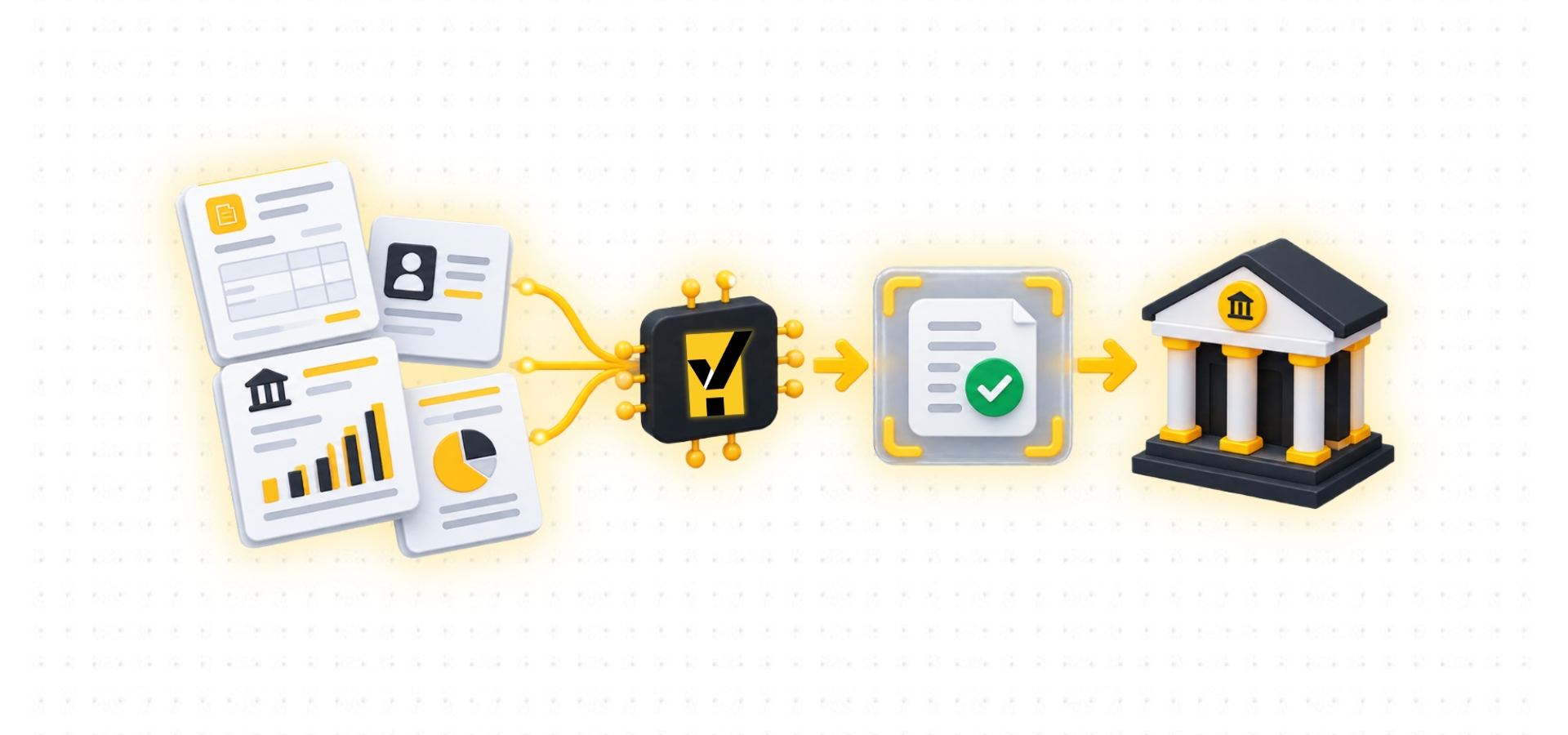
Financial organizations are highly document-intensive.
They may process:
Account-opening documents
KYC documents
Loan applications
Financial statements
Customer forms
Invoices
Trade finance documents
IDP can extract relevant information and make it available to downstream workflows.
KYC workflows may involve:
Identity documents
Address proofs
Application forms
Business registration documents
IDP can extract relevant information and organize it for verification.
IDP in Insurance
Insurance organizations handle large volumes of documentation.
Claims may involve:
Claim forms
Policy documents
Bills
Receipts
Repair estimates
Supporting reports
IDP can extract claim numbers, policy information, dates, amounts, and other relevant information before routing the case to an employee.
The employee can then focus on reviewing the claim rather than manually entering basic information.
IDP in Retail
Retail businesses may process:
Supplier invoices
Purchase orders
Goods Receipt Notes
Delivery documents
Product information
Customer forms
A typical retail workflow may look like:
Purchase Order → Goods Received → Supplier Invoice → Matching → Approval → Payment
IDP can help extract and structure information at different stages of this process.
IDP in Aviation
Aviation operations can involve large amounts of operational and regulatory information.
Depending on the workflow, organizations may handle:
Flight-related documents
Operational forms
Regulatory documents
Cargo documentation
Maintenance records
Applications
Emails and attachments
IDP can help extract information from these sources and support downstream operational workflows.
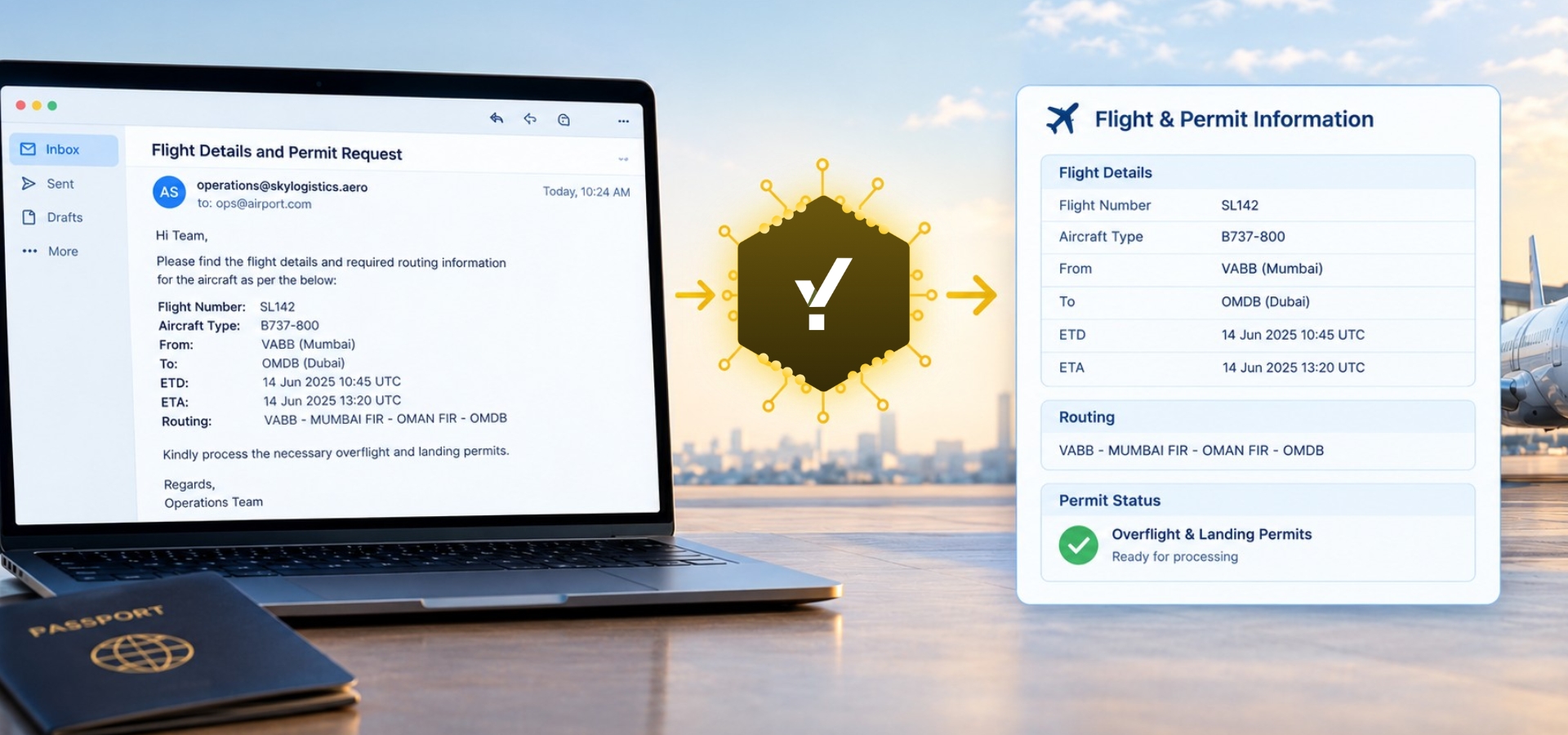
Example: Overflight Permit Request Automation
A practical example is the processing of overflight permit requests received through email.
A request may contain information such as:
Flight number
Callsign
Aircraft type
Aircraft registration
Origin
Destination
Routing
Overflight countries
FIRs
Schedule
Crew
Cargo
Operational remarks
Instead of an operations employee manually reading the email, interpreting the routing, identifying the relevant permit requirements, and transferring the information into the operational system, an intelligent workflow can help automate the information-processing layer.
The workflow can be represented as:
Permit Request Email → Extract Flight Details → Understand Routing → Identify Permit Requirements → Validate → Structure Information → Existing Aviation System
This illustrates how IDP can be applied not only to PDFs but also to email-driven operational workflows.
How AI Document Processing Reduces Manual Data Entry
Manual data entry is one of the clearest areas where IDP can create value.
Consider a company receiving 1,000 invoices per month.
If employees spend an average of five minutes entering information from each invoice, that represents approximately:
5,000 minutes of manual work per month
or more than:
83 hours per month.
If an IDP workflow can automate a significant portion of that work, employees can spend less time on repetitive entry and more time on exceptions and higher-value activities.
The same principle applies to:
Applications
Claims
Logistics documents
Forms
Reports
Procurement documents
The goal is not necessarily to eliminate human involvement.
It is to move employees from repetitive data entry toward exception handling, analysis, and decision-making.
How IDP Improves Data Quality
Manual data entry can create errors because people may:
Misread numbers
Enter the wrong field
Skip information
Type incorrect dates
Mistype amounts
Create duplicate entries
IDP can combine automated extraction with validation rules.
For example:
Quantity × Unit Price = Line Total
or:
Subtotal + Tax − Discount = Total
When an inconsistency is detected, the system can flag the document for review.
This creates a combination of:
AI extraction + Business Rules + Human Validation
which can improve processing reliability.
Challenges and Limitations of Intelligent Document Processing
IDP can provide significant value, but it is not magic.
Organizations should understand its limitations before implementation.
Poor-quality documents
Very low-quality scans can affect extraction.
Handwriting
Handwritten information can be more difficult to process accurately.
Complex layouts
Unusual document layouts may require additional configuration or model capabilities.
Ambiguous information
Some information requires human judgment.
Exceptions
No automated system should be expected to handle every possible document perfectly.
Integration
Connecting an IDP solution with ERP, CRM, accounting, logistics, or other systems may require technical work.
Security and privacy
Organizations processing sensitive information need appropriate security controls, access management, and data governance.
Implementation effort
Successful IDP implementation requires more than purchasing software.
Organizations need to identify suitable workflows, define requirements, establish validation rules, test with real documents, integrate systems, and monitor performance.
How to Choose Intelligent Document Processing Software
When evaluating IDP software, businesses should consider:
1. Document types
Can the platform process the documents your organization actually receives?
2. Extraction capabilities
Can it extract the fields your workflow requires?
3. Accuracy
How does it perform with real-world documents, layouts, and document quality?
4. Scalability
Can it support current and future document volumes?
5. Integration
Can it connect with existing ERP, CRM, accounting, WMS, TMS, or custom systems?
6. Human review
Does it support exception handling and human-in-the-loop workflows?
7. Validation
Can business rules and cross-document checks be applied?
8. Security
How is business and customer information protected?
9. Analytics
Can teams monitor:
Processing volumes
Exceptions
Accuracy
Processing time
Workflow performance
10. Implementation
How easily can the solution be configured, integrated, tested, and maintained?
The best IDP platform is not necessarily the one with the most features.
It is the one that solves the organization's specific document-processing problem effectively.
How Businesses Can Implement IDP
Successful implementation should usually start with a focused workflow.
Instead of trying to automate every document immediately, organizations can begin with one high-volume, repetitive process.
Step 1: Identify a document-heavy process
Examples include:
Claims processing
KYC
Procurement documents
Logistics documents
Delivery verification
Step 2: Measure the current process
Track:
Document volume
Processing time
Manual effort
Error rates
Processing costs
Exception rates
Step 3: Define the required information
Determine exactly what information needs to be extracted and validated.
Step 4: Define business rules
Determine what should happen when information is:
Missing
Incorrect
Inconsistent
Uncertain
Step 5: Test with real documents
Use documents from different suppliers, customers, layouts, and quality levels.
Step 6: Integrate with business systems
Connect the workflow to the ERP, WMS, TMS, accounting system, or other application where the information is required.
Step 7: Monitor performance
Track:
Extraction accuracy
Exception rate
Processing time
Manual effort
Straight-through processing
Business turnaround time
Step 8: Expand gradually
Once the first workflow is stable, extend IDP to additional document types and departments.
IDP and Business Process Automation
IDP becomes more valuable when it is connected to a larger business workflow.
Document extraction is only one part of the process.
A complete workflow might look like:
Document Received
↓
Document Classified
↓
Information Extracted
↓
Information Validated
↓
Business Rule Applied
↓
Exception Reviewed
↓
Data Structured
↓
ERP/System Updated
↓
Next Business Action Triggered
This is where IDP moves from document reading to business process automation.
IDP and Unstructured Data
One of the biggest challenges businesses faces is unstructured information.
Structured data is organized in predictable fields:
Customer | Invoice No. | Amount |
ABC Ltd | INV-1001 | ₹50,000 |
Unstructured information may instead exist inside:
PDFs
Emails
Contracts
Reports
Scanned documents
Images
The information exists, but business systems cannot always use it directly.
IDP helps convert that information into structured business data.
This is why IDP can act as a bridge between unstructured information and business systems.
IDP and Semi-Structured Documents
Many real-world business documents are semi-structured.
Invoices are a good example.
They commonly contain:
Invoice number
Supplier
Date
Line items
Tax
Total
But the location and presentation of those fields can change from supplier to supplier.
One supplier may place the invoice number at the top right.
Another may place it in the middle.
Another may use a different label altogether.
This is where intelligent document processing can provide an advantage over rigid template-based approaches by using context and document understanding.
The Role of Human Review in IDP
Human review remains important in many business workflows.
Imagine an organization processing 50,000 documents.
Most may be straightforward.
A small percentage may contain:
Unclear scans
Missing fields
Unusual formats
Handwritten information
Conflicting data
Instead of sending all 50,000 documents to employees, an IDP workflow can process high-confidence documents automatically and send only exceptions for review.
This approach helps reduce manual workload while retaining human oversight.
IDP and Data Quality
Extracted information often becomes input for another business system.
If incorrect information enters an ERP, accounting platform, CRM, logistics system, or other application, the error can affect downstream processes.
Therefore, IDP should not stop extraction.
A reliable workflow should consider:
Capture → Extract → Validate → Review → Structure → Integrate
This creates a stronger data pipeline between documents and business systems.
Why Is Intelligent Document Processing Becoming More Important?
Several trends are increasing the importance of IDP.
Growing document volumes
Businesses continue to generate and receive large amounts of digital information.
Increasing customer expectations
Customers expect faster processing and response times.
Pressure to improve efficiency
Organizations need to process more information without increasing manual effort at the same rate.
Growth of AI
AI technologies are becoming increasingly capable of understanding documents and business contexts.
Cloud adoption
Cloud-based systems make it easier to connect document processing with enterprise applications.
Digital transformation
Organizations are moving from isolated manual tasks toward connected, automated workflows.
Together, these trends are increasing the demand for intelligent document processing.
The Future of Intelligent Document Processing
IDP is evolving beyond basic OCR and field extraction.
Future document intelligence systems are expected to become increasingly capable of:
Understanding complex documents
Interpreting context
Processing multimodal information
Identifying relationships between documents
Detecting anomalies
Supporting decision-making
Automating complex workflows
Processing emails and attachments
Connecting information across enterprise systems
The progression can be viewed as:
Read the document
↓
Extract information
↓
Understand the document
↓
Understand the business context
↓
Take appropriate business action
Generative AI and Intelligent Document Processing
Generative AI is also influencing document processing.
Traditional extraction systems generally focus on predefined fields.
Generative AI can add capabilities such as:
Summarization
Question answering
Document comparison
Context understanding
Natural-language interaction
Information interpretation
For example, instead of simply extracting contract dates, a document intelligence system could allow an employee to ask:
"What are the renewal conditions in this contract?"
and receive an answer based on the document.
However, generative AI should be implemented carefully in business workflows where accuracy, security, privacy, and compliance matter.
Intelligent Document Processing and Document Intelligence
The term document intelligence is increasingly used for systems that go beyond text recognition.
Document intelligence focuses on understanding:
Meaning
Structure
Relationships
Context
The progression can be understood as:
OCR → Data Extraction → Document Understanding → Intelligent Automation
OCR reads the document.
Data extraction identifies useful information.
Document intelligence understands the information and its relationships.
Intelligent automation uses that understanding to support business processes.
YellowChunks and Intelligent Document Processing
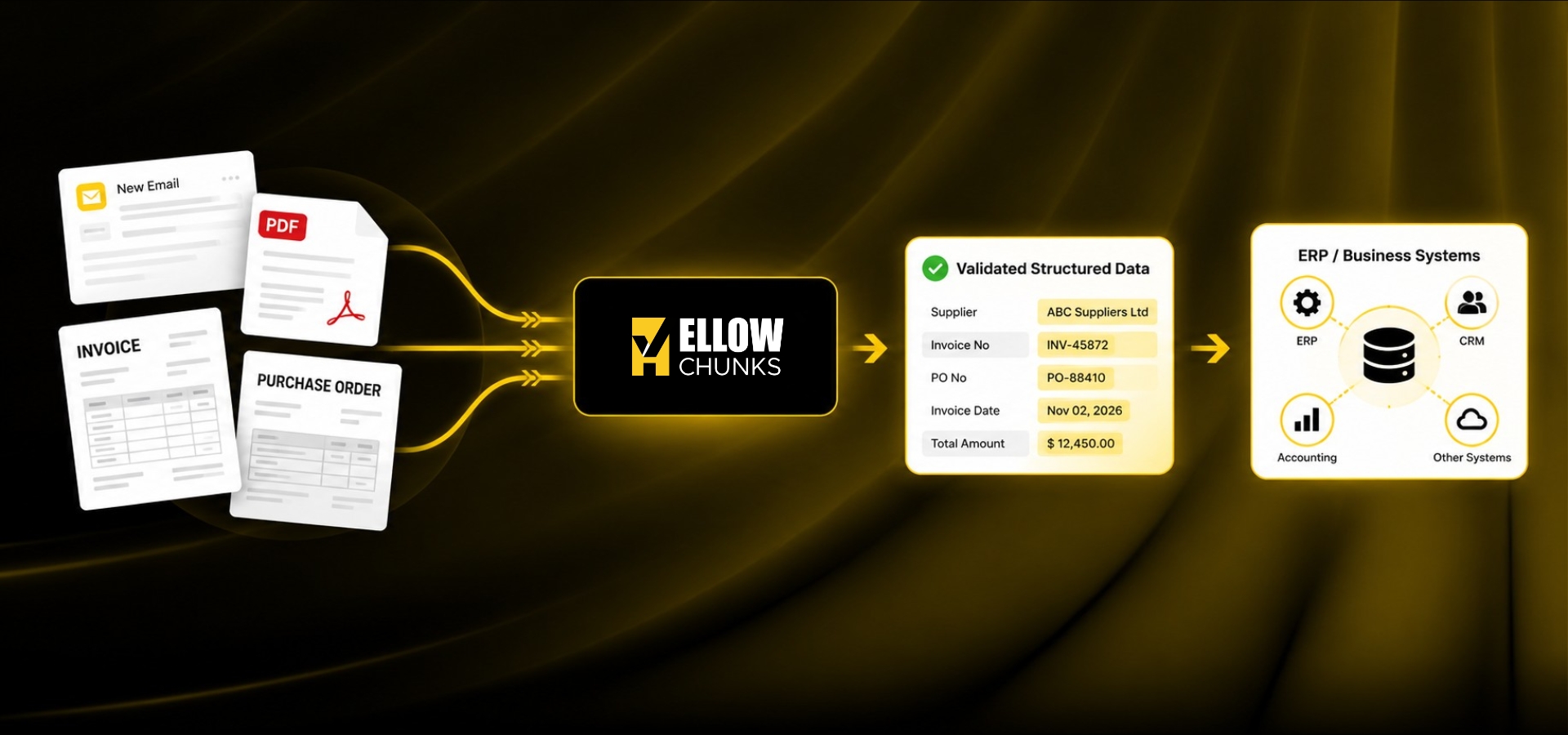
This is where intelligent document processing becomes particularly relevant to the business problem YellowChunks is designed to address.
YellowChunks is an AI-powered email and document intelligence platform that helps businesses turn unstructured information into structured, validated business data.
The important point is that YellowChunks are not positioned as an OCR-only tool.
It is designed around the workflow that happens between incoming emails/documents and the existing business system.
That workflow can involve:
Email/Document → Extract → Understand → Validate → Exception Handling → Structured Data → Business System
The existing ERP, TMS, WMS, accounting system, or other business applications can remain in place.
YellowChunks addresses the manual intelligence layer around those systems.
For example, businesses may still have employees manually:
Reading supplier documents
Identifying relevant records
Comparing information
Checking quantities
Validating references
Identifying discrepancies
Transferring information into enterprise systems
These are the types of repetitive information-processing activities where intelligent document processing can create value.
Practical YellowChunks Use Cases
The specific workflow depends on the organization's process, document types, systems, and business requirements.
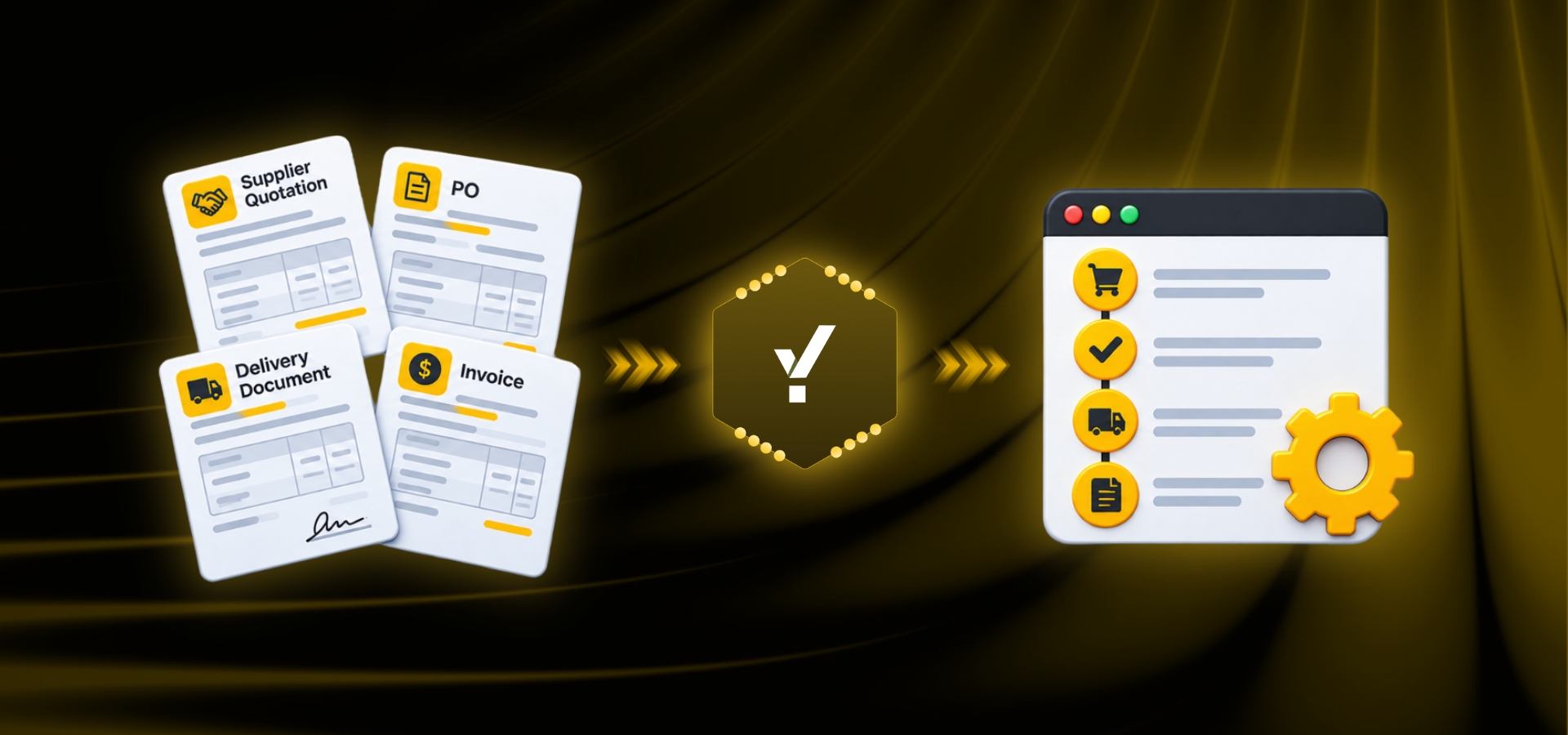
Procurement
Supplier Quotation → Extract → Structure → Compare → Procurement Workflow
Purchase Order and Delivery Document Validation
PO in ERP → Supplier DO → Extract → Match → Validate → Exceptions → ERP
Finance
Invoice → Extract → Validate → Match → Exception Handling → ERP
Logistics
POD → Shipment Matching → Verification → Exception Handling
Retail
Supplier Document → Product/SKU Mapping → Validation → ERP
Aviation
Overflight Permit Email → Flight/Routing Understanding → Permit Identification → Structured Information → Aviation System
Banking and Trade Finance
Trade Documents → Extract → Compare → Validate → Human Review
The objective is consistent across these use cases:
Reduce the manual interpretation and data-processing work between unstructured information and the systems where that information needs to be used.
A Practical Example: Email to Enterprise System
Consider an aviation support workflow where overflight permit requests arrive through email.
A request may contain flight and aircraft details, routing information, timing, and other operational information.
A traditional workflow may look like:
Email → Operations employee reads → Interprets details → Identifies permit requirements → Manually enters information into the system
An intelligent workflow can instead support:
Email → YellowChunks → Extract information → Understand routing → Identify permit requirements → Validate → Structure information → Existing aviation system
This illustrates an important principle:
The goal of IDP is not simply to read the email. It is to turn the information inside the email into usable business data.
Measuring the Success of an IDP Project
Organizations should not measure IDP success only by extraction accuracy.
Business outcomes matter more.
Important metrics include:
Processing time
How long does it take to process a document?
Straight-through processing rate
What percentage of documents can move through the workflow without manual intervention?
Exception rate
How many documents require human review?
Extraction accuracy
How accurately are the required fields extracted?
Manual effort
How much employee time is saved?
Cost per document
What does it cost to process each document?
Processing volume
How many documents can the organization process?
Business turnaround time
How much faster does the complete process become?
These metrics help determine whether IDP is creating a measurable business value.
Common Mistakes Businesses Should Avoid When Implementing IDP
Trying to automate everything immediately
Start with a focused, high-value workflow.
Choosing technology before understanding the problem
Understand the document volumes, document types, manual effort, and process requirements first.
Ignoring exceptions
No document automation system should assume every document will be perfect.
Focusing only on extraction accuracy
The objective is business process improvement—not simply text recognition.
Forgetting integrations
Extracted information needs to reach the system where it will actually be used.
Not measuring results
Without metrics, it is difficult to determine whether the implementation is creating meaningful business value.
Is Intelligent Document Processing the Same as Document Automation?
Not exactly.
Document automation is a broad concept involving the automation of document-related workflows.
Intelligent Document Processing is a more specialized approach that uses AI and related technologies to understand and process information contained within documents.
They often work together.
For example:
IDP extracts information from an invoice.
Document automation moves that information through the business workflow.
Together, they can create an automated document-processing solution.
Is IDP Suitable for Small Businesses?
Yes.
Intelligent document processing is not limited to large enterprises.
Small and medium-sized businesses can also benefit when they deal with repetitive, document-heavy workflows.
The more important questions are:
How many documents are processed?
How much manual effort is involved?
How costly are errors?
How important is processing speed?
Can the process be standardized?
If employees spend significant time on repetitive document processing, IDP may be worth evaluating.
How Does IDP Support Digital Transformation?
Digital transformation is not simply about moving paper documents into PDFs.
The larger objective is to improve how information moves through an organization.
Digitization
Paper invoice → PDF invoice
The document is digital, but employees may still manually read and enter the information.
PDF invoice → Automated extraction → Accounting system
Intelligent Automation
PDF invoice → AI classification → Context-aware extraction → Validation → Business Rules → Approval → Accounting System
The third approach represents a more connected form of intelligent process automation.
Frequently Asked Questions About Intelligent Document Processing
What is Intelligent Document Processing?
Intelligent Document Processing, or IDP, is a technology approach that combines AI, machine learning, OCR, NLP, computer vision, validation, and automation to capture, extract, understand, validate, and process information from documents.
How does Intelligent Document Processing work?
IDP generally works by capturing documents, classifying them, reading and extracting information, understanding context, validating the results, handling exceptions, structuring the information, and connecting it to business workflows or applications.
What is the difference between OCR and IDP?
OCR primarily recognizes text from documents and images. IDP goes further by classifying documents, understanding context, extracting business information, validating data, handling exceptions, and supporting workflow automation.
What are the benefits of Intelligent Document Processing?
Key benefits can include reduced manual data entry, faster processing, improved efficiency, greater scalability, more consistent processing, improved data accessibility, and automation of repetitive document-heavy workflows.
What documents can IDP process?
Depending on the platform, IDP can process invoices, purchase orders, quotations, receipts, forms, contracts, claims, bank documents, KYC documents, logistics documents, reports, emails, and many other business documents.
Is Intelligent Document Processing the same as AI document processing?
The terms are closely related.
AI document processing refers broadly to using artificial intelligence to process documents.
IDP is a broader document-processing approach that can combine AI with OCR, machine learning, NLP, computer vision, validation, workflow automation, and system integration.
Can IDP process handwritten documents?
Some IDP systems can process handwriting, but accuracy depends on handwriting quality, document quality, language, and the capabilities of the specific technology.
Handwritten information may require additional validation or human review.
Can IDP process PDFs?
Yes. IDP systems can commonly process digitally generated PDFs and scanned PDFs, depending on the platform.
Can IDP process emails?
Many document-processing workflows can incorporate emails and their attachments.
For example, an invoice received as an email attachment can be routed into an invoice-processing workflow.
Does IDP eliminate human workers?
No.
The objective is generally to automate repetitive work and allow employees to focus on activities requiring judgment, expertise, and decision-making.
Human review can remain an important part of workflows involving exceptions or low-confidence information.
Is IDP better than traditional OCR?
OCR and IDP serve different purposes.
OCR is primarily focused on recognizing text.
IDP combines OCR with additional intelligence to classify documents, understand information, extract business data, validate it, and support workflows.
Businesses looking for end-to-end document automation may therefore need capabilities beyond OCR alone.
How can IDP reduce manual data entry?
IDP can automatically extract information from documents and convert it into structured data.
Instead of employees manually copying every field into business applications, the information can be extracted, validated, and transferred automatically or routed for review.
What industries use Intelligent Document Processing?
IDP can be applied across many industries, including:
Banking
Financial services
Insurance
Logistics
Supply chain
Retail
Procurement
Healthcare
Manufacturing
Aviation
Professional services
The strongest use cases generally involve repetitive, document-heavy workflows with meaningful processing volumes.
What is AI-powered document processing?
AI-powered document processing refers to using artificial intelligence to analyze and process documents.
AI can support document classification, information extraction, context understanding, validation, and workflow decisions.
What is document data extraction?
Document data extraction is the process of identifying and capturing useful information from a document.
For example, extracting an invoice number, supplier name, invoice date, tax amount, and total amount from an invoice is document data extraction.
What is automated data extraction?
Automated data extraction uses software to capture information from documents without requiring an employee to manually enter every field.
AI-powered systems can make this process more flexible by understanding different document layouts and contexts.
What is machine learning document processing?
Machine learning document processing uses machine learning models to identify patterns in documents and support classification and information extraction.
It can be used as part of a broader Intelligent Document Processing solution.
How do businesses choose IDP software?
Businesses should evaluate:
Document types
Extraction requirements
Accuracy
Scalability
Integrations
Security
Validation
Human review
Implementation complexity
Business value
The right platform should solve the organization's actual document-processing problem rather than simply provide the largest number of features.
Conclusion
Documents remain a major source of business information.
Invoices, purchase orders, quotations, forms, applications, contracts, claims, reports, shipping documents, emails, and other records contain information that businesses need every day.
The challenge is that much of this information is still processed manually.
Employees may spend hours reading documents, extracting information, entering data, checking values, comparing records, and moving information between systems.
As document volumes increase, this approach becomes increasingly difficult to scale.
Intelligent Document Processing provides a way to address this challenge.
By combining artificial intelligence, machine learning, OCR, NLP, computer vision, document intelligence, validation, and workflow automation, IDP can help organizations move from manual document processing toward intelligent document automation.
But the real value of IDP is not simply its ability to read documents.
It is its ability to:
Extract → Understand → Validate → Structure → Integrate → Automate
This can help organizations reduce repetitive manual work, improve processing speed, handle larger information volumes, and allow employees to focus on higher-value activities.
From invoice processing and procurement automation to logistics documents, POD verification, KYC, insurance claims, banking, retail, aviation, and email-driven workflows, the potential applications are broad.
As AI continues to evolve, IDP is moving beyond basic extraction toward deeper document understanding and more sophisticated business process automation.
For businesses looking to reduce the burden of manual document processing and make better use of the information contained in their documents, Intelligent Document Processing can become an important part of their digital transformation strategy.
The future of document processing is not simply about making documents digital.
It is about making the information inside them accessible, understandable, validated, actionable, and connected to the business processes that depend on it.
Explore Intelligent Document Processing with YellowChunks
If your team still spends time reading emails and documents, extracting information, checking it against existing records, and entering it into ERP or other business systems, there may be an opportunity to automate that workflow.
YellowChunks helps businesses build an intelligent layer between unstructured information and existing enterprise systems.
Explore YellowChunks to see how intelligent email and document processing can fit into your business workflow.

AUTHOR

Digital Marketing Executive